

To Setup Outlook 2010 (IMAP)
follow below steps:
Adding a new account:
- Select the ‘File’ menu
- Select Info
- Click the Add Account button
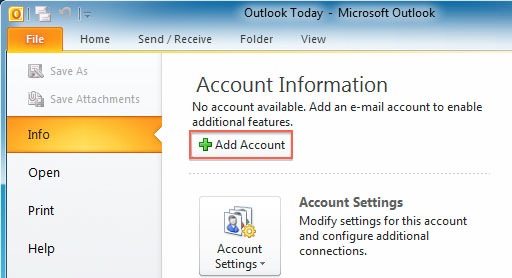
Set up outlook 2010 emails
4. Choose Manually configure server settings

5. Click Next
6. Choose Internet E-Mail
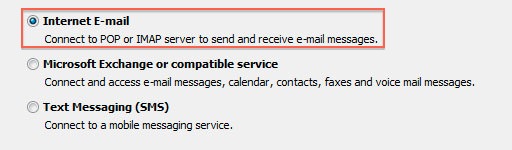
7. Click Next
Account Settings
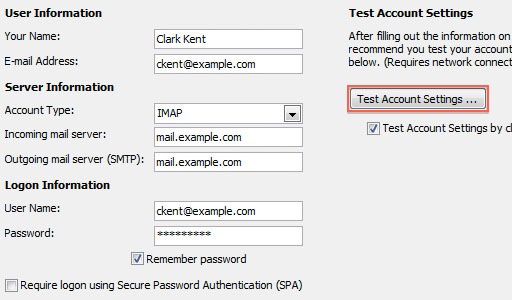
- Enter your name as you want it to appear on your outbound email messages
- Enter your full email address
- Enter your full email address also as the User Name
- Enter your email password
- Your mail server is mail.YourDomain.com, eg mail.example.com (where YourDomain.com is your own domain name)
- The Outgoing Mail Server is the same as your incoming mail server
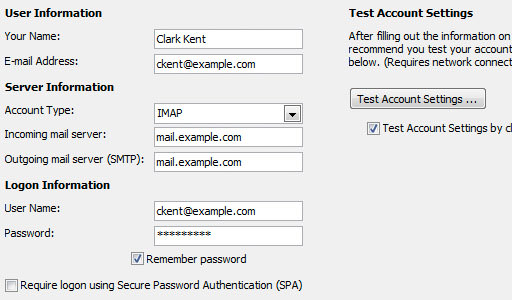
More Settings
- Click the More Settings button
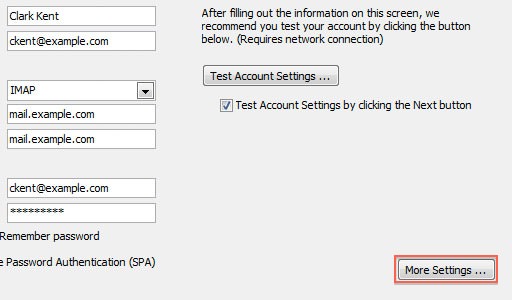
2. Click the Outgoing Server tab
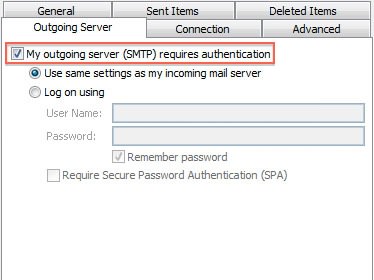
3. Check the “My outgoing server (SMTP) requires authentication” checkbox
4. Check “use the same settings as your incoming mail server”
5. Click the Advanced tab
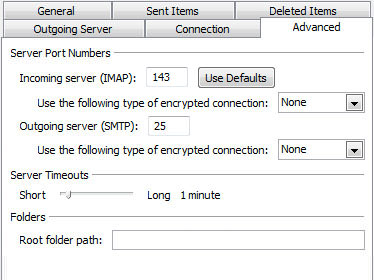
6. If you are using POP3 with SSL, click the checkbox and enter 995 as your port. Otherwise leave the default port at 110
7. If you are using POP3, you may choose when messages are removed from the server
8. If you are using IMAP with SSL, click the checkbox and enter 993 as your port. Otherwise leave the default port at 143
9. If you are using SMTP with SSL, click the checkbox and enter 465 as your port. Otherwise change non-default port to 26
10. Click the OK button
Testing Settings (Final Step)
1. While on the E-mail Accounts screen, click the Test Account Settings button
2. This will both check your settings and send a test email to yourself to confirm that everything is working. If you receive any errors, please check your configuration
3. Click the Close button on the Test Account Settings window
4. Click Next on the E-mail Accounts window
5. Click the Finish button
Done.
Like Us on Facebook:
Follow Us on Linkedin:
If you are looking for a web design dubai based company for your website design work, then you must contact us for a better web design deal. Choosing your web design dubai based company really matters for your company web design work.
