Category

blog

How do I set up Domains email on my iPhone?

By blog

Please check with your phone’s instruction manual for specific set up instructions.
To , please follow these steps:

Step-1.

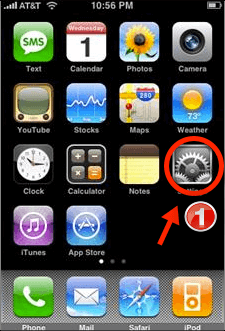
Tap on Settings from your home screen. Your settings panel displays.
How do I set up mail on my iphone- tech_1

Step-2.

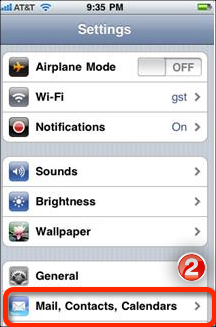
Scroll down and tap Mail, Contacts, Calendars.
How do I set up mail on my iphone-tech_ 2

Step-3.

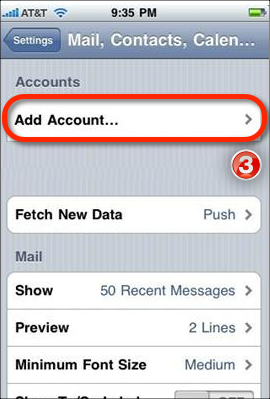
Tap on Add Account.
How do I set up mail on my iphone- tech_3

Step-4.

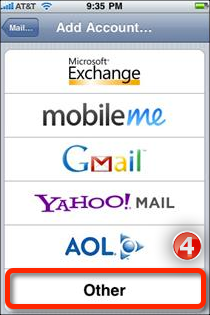
Scroll to the bottom of the screen and tap Other.
How do I set up mail on my iphone-tech_ 4

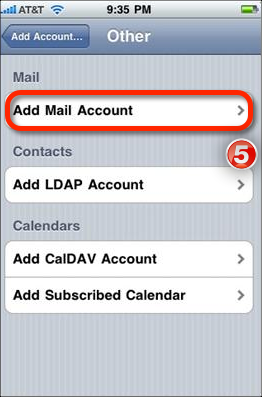
Step-5.

Tap Add Mail Account.
How do I set up mail on my iphone- tech_5

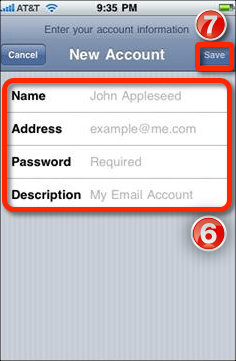
Step-6.

Enter your name, your full email address (email@yourdomain.com), your password and any description you would like for the account).

Step-7.

Tap Save.
How do I set up mail on my iphone-tech_ 6

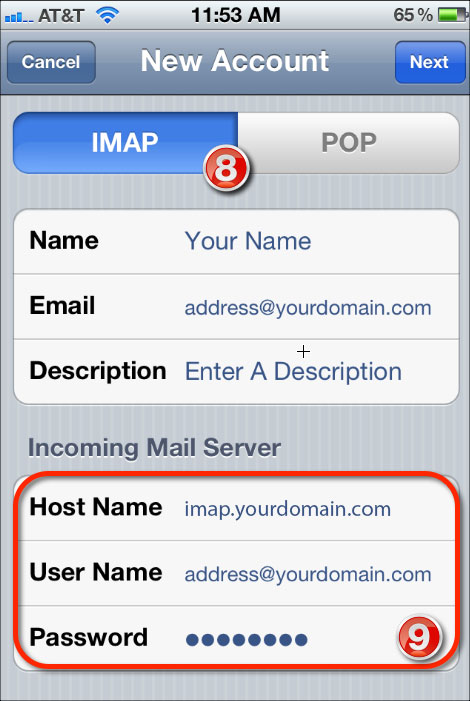
Step-8.

Ensure IMAP is selected at the top of the screen.

Step-9.

Enter imap.yourdomain.com for Host Name. Enter your User Name and full email address and password.
How do I set up mail on my iphone- tech_8 9

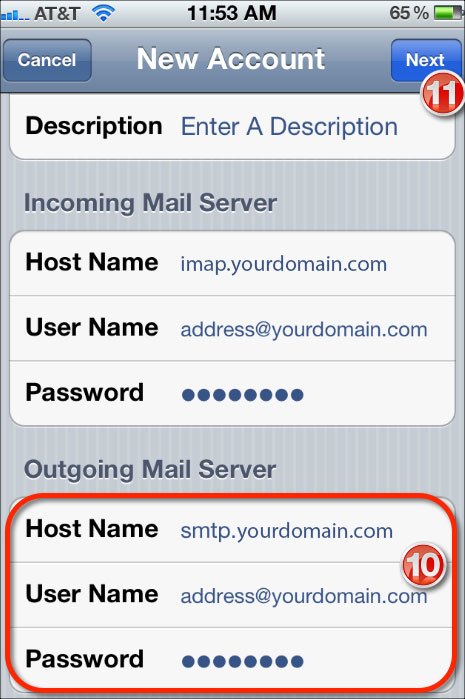
Step-10.

Scroll down and enter smtp.yourdomain.com for the Host Name.

Step-11.

Tap Next. This will verify your settings and then take you to your Inbox.
How do I set up mail on my iphone- tech_10 11

That’s all you have done

Like Us on Facebook:  

Follow Us on Linkedin:  

If you are looking for a based company for your website design work, then you must contact us for a better web design deal. Choosing your based company really matters for your company web design work.

Google Analytics User Manual

By blog

Below steps we are going to show you some important steps required to know about your google analytics. You can view your google anaytics if your website design company already configured your website with google analytics, Also analytics will show only from the date you configured to your website.

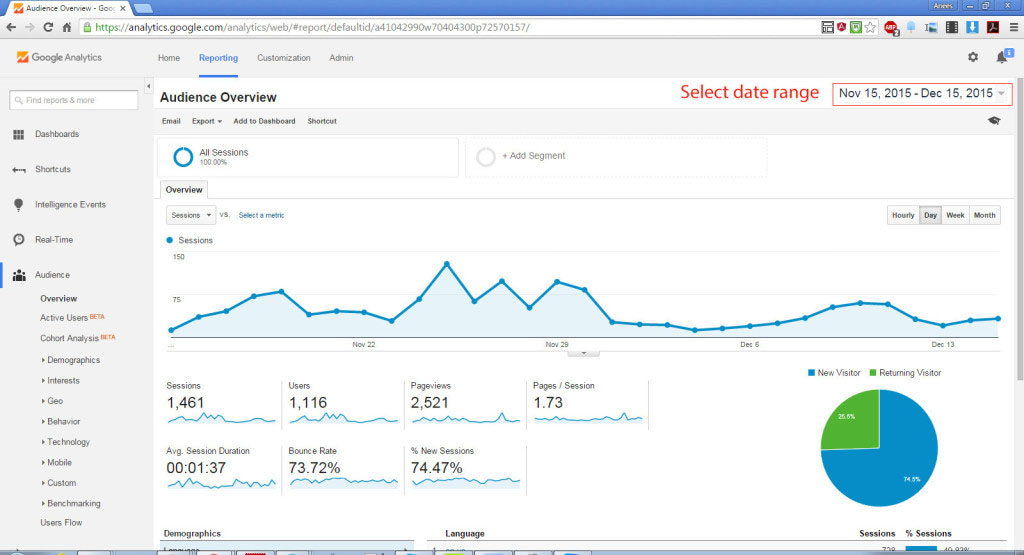
1. Select date range:

By default google analytics will show you past 30 days analytics, You can change date range and can check any particular days visitors to your website.
Google Analytics User Manual step 1

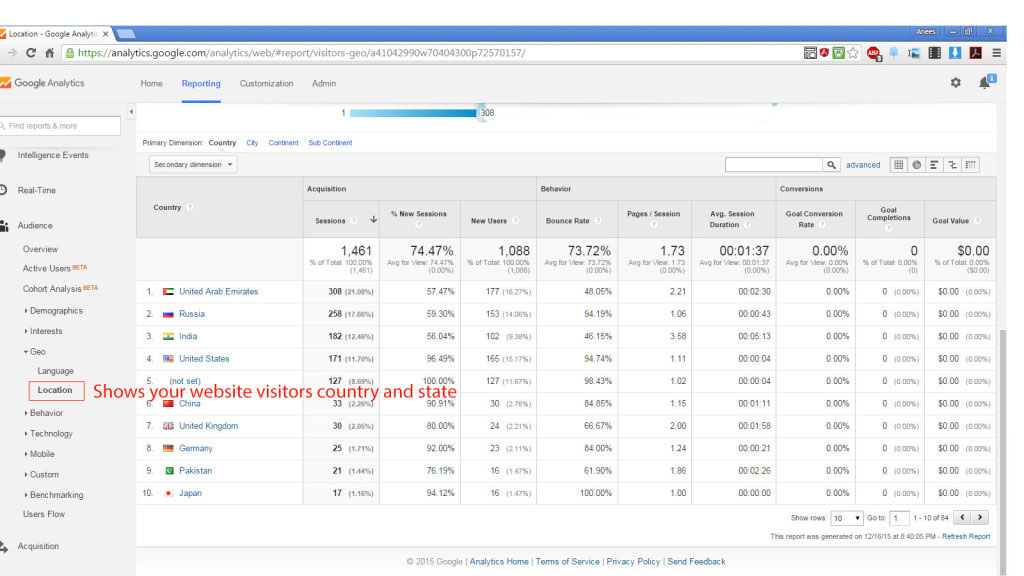
2. Geo Location (Shows your website visitors country and state):

This is one of the most important feature in google analytics, From your dashboard Audience -> Geo -> Location you will get all the visitors location details, Sessions says how many times visited your website.

You can also click on the country which will take you to that particular country state wise visitors details.
Google Analytics User Manual step 2

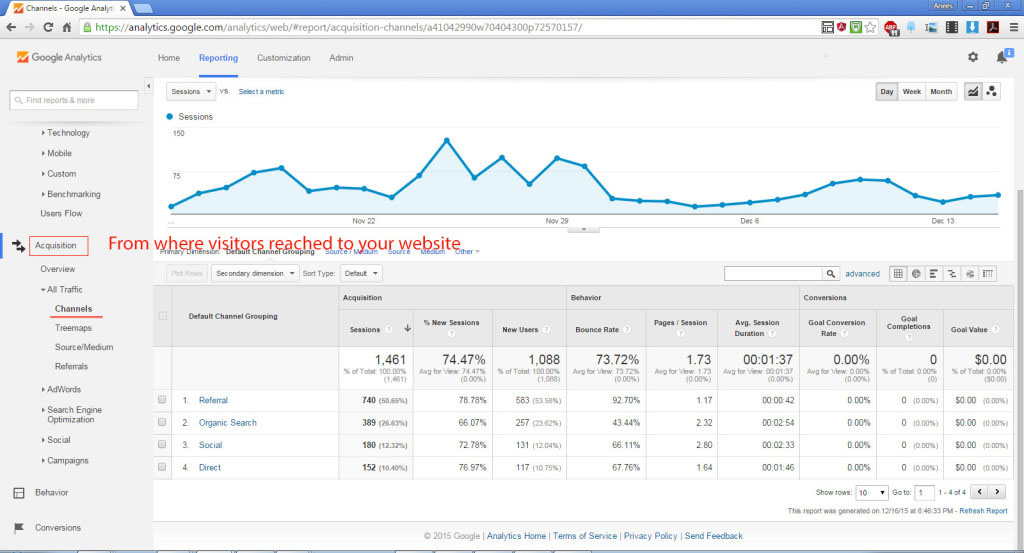
3. Acquisition (From where visitors reached to your website):

This option will show you from where your visitors came from. This is very important tool that we can monitor from where our visitors reached to our website. There are 4 sub options in this:

A) Referral: This option will tell you if anybody reached to your website from clicking from another website. In this case referral website will be listed here.
B) Organic Search: This option will show you from google’s search result how many times your website visited.
C) Social: From social media pages how many visitors came to your website.
D) Direct: This option is to tell you that how many times people directly typed your domain name and entered to your website.

Google Analytics User Manual step 3

For more information and configuration of your google analytics email us to contact@techcybers.com

Like Us on Facebook:  

Follow Us on Linkedin:  

If you are looking for a based company for your website design work, then you must contact us for a better web design deal. Choosing your based company really matters for your company web design work.

Web Design Dubai

By blog


Tech Cybers is a full service web design and development company in UAE. We offer a complete range of web solutions, from the Domain registration, Web hosting, Search engine optimization, Social media marketing, Email marketing, Google Apps installation, keyword based advertising like Google adwords, Google Analytics, and pay per click ads.

And, of course, we take security infrastructure seriously. We won’t deliver a website that isn’t as secure as possible.

Our web design and web development experts have years of experience. Whether you’re looking for a basic website with customer interactions, or a fully fleshed out web application to pull together a global enterprise, we’ve got the knowledge and experience to get it done.

All of our designers and developers keep up to date with the latest web technologies. We know when and where to use them. We’re able to deliver the best in web design and development because our designers and developers are committed to researching new technologies to ensure that the websites we deliver stand out from the rest.

Like Us on Facebook:  

Follow Us on Linkedin:  

If you are looking for a based company for your website design work, then you must contact us for a better web design deal. Choosing your based company really matters for your company web design work.
Spam trigger words to avoid

By blog

Spam trigger words to avoid
Spam is a huge issue on the internet these days and unfortunately, it has impacted on businesses that send legitimate bulk emails using database marketing tools. It means that we have to work alot harder to get our emails to our reader’s inboxes.

All email programs (from Hotmail to Outlook) have in-built spam filters that scan incoming emails to determine if they are spam. One of the things it checks out is the words in the content of the email and in the subject line – if it finds words that are ‘spammy’, the program will mark your email as spam and the recipient will probably never see it.

So if you want to make sure they do read you emails, you need to avoid the words below:

#1 $$$ 100% free 100% Satisfied 4U Accept Credit Cards Act Now! Ad Additional Income Affordable All natural All new Amazing Amazing stuff Apply now Apply Online Auto email removal Bargain Best price Billing address Billion Buy direct Call Call free Can’t live without Card Accepted Cash bonus Cents on the dollar Cheap Check Claims Click / Click Here / Click below Click ro remove Collect child support Compare rates Compete for your business Congratulations Cost / No cost Credit Credit bureaus Dear friend Dig up dirt on friends Do it today Double your income Earn $ Earn extra cash Eliminate debt Email marketing Explode your business Extra income For free Form F r e e Free and FREE Fast cash Financial freedom Financially independent Free Free gift Free grant money Free info Free installation Free investment Free leads Free membership Free offer Free preview Free website Full refund Get it now Giving it away Guarantee Here Hidden ‘Hidden’ assets Home based Home based business Income from home Increase sales Increase traffic Increase your sales Incredible deal Info you requested Information you requested Internet market Insurance Investment / No investment Investment decision Leave Legal Lose Limited time offer Make $ Marketing Marketing solutions Message contains Money Month trial offer Mortgage Rates Multi level marketing Name brand Never No gimmicks No hidden Costs No investment No-obligation Now Obligation Offer One time / one-time Online marketing Opportunity Order / Order Now / Order Status Orders shipped by Performance Phone Please read Potential earnings Pre-approved Prices Print out and fax Priority mail Profits Promise you Real thing Refinance Remove / Removal Reverses aging Risk free Sales Satisfaction guaranteed Save $ Search engine listings / search engines See for yourself Serious cash Solution Special promotion Success Stock disclaimer statement Stop snoring The following form Thousands Unsolicited Unsubscribe Urgent US dollars Web traffic Weight loss Wife Win Winner Work at home

Obviously some of the words are common business phrases, like ‘web traffic’ and ‘free offer’, so it is difficult to avoid them. We suggest that if you must use one of these phrases, just use it once per email otherwise you are risking getting your email blocked. If you can, try to use synonyms like ‘complimentary’ instead of ‘free’ or changing the wording slightly so you don’t get picked up by the spam filters.

Also, make use of the in-built spam measuring tool in the Database Marketing System – this looks for key spam words in your text and checks the coding side of your emails which is equally important for getting your emails through filters.

Like Us on Facebook:  

Follow Us on Linkedin:  

If you are looking for a based company for your website design work, then you must contact us for a better web design deal. Choosing your based company really matters for your company web design work.
Why Need Mobile Responsive Web Design

By blog

why need mobile responsive web design

1. Google Gives High Priority for Responsive .
2. No Need Multi Versions of Your Website for Mobile and Desktops.
3. In Mobile Device No Need to Zoom or Slide right or Left to See Your Content.
4. Smooth User Experience.
5. No Need Redirects to Mobile Site.
6. One Management System to Update Content for Mobile and Desktops.
7. Flexible Navigation Styles.

How Works?

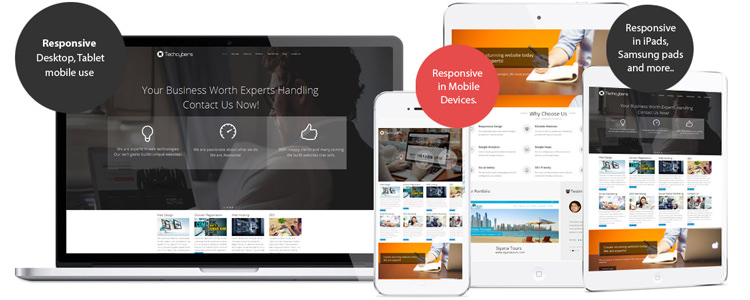
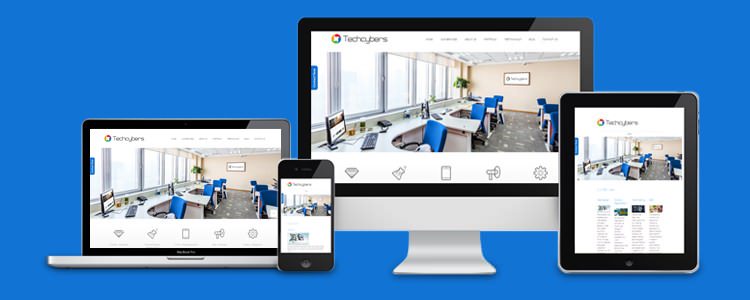
The word “responsive” in web design field means that the entire layout responds based on the user’s screen resolution or the device which he or she opens the website. There are situations that a person were browsing a website on his tablet, then switched to another device for one reason or another. In this case the browser window will re-sized automatically. A responsive Responsive Design layout will automatically adjust the resolution according to the device.

Why Design for Mobile?

It is true that more users are going mobile and spending more time in mobile devices, and not just for on-the-go web browsing either.
“In this era designing for mobile is certainly a requirement in modern day standards.”

is The Future of The Web

is all about automatically delivering your audience the content they want, within the context that they’re viewing it.

It is revolutionary for online publishers, because (for most) responsive design eliminates the need for multiple versions of your site, or expensive app development and maintenance.

Conclusion

is pretty cool. You can drag and drop the browser window smaller and bigger and watch the website content change according to the size of the window. This is applicable for testing purpose only.

Like Us on Facebook:  

Follow Us on Linkedin:  

If you are looking for a based company for your website design work, then you must contact us for a better web design deal. Choosing your based company really matters for your company web design work.
Mobile Responsive Web Design

By blog

Mobile Responsive Web Design

Almost every new client these days wants a mobile version of their website. It’s practically essential we are experts in . Responsive is also called RWD is must for the future websites as majority of people now using iPads and phones for their internet browsing.

This era more devices coming with varying screen resolutions. New devices with new screen sizes are being developed every day, and each of these devices may be able to handle variations in size, functionalitys. Some devices are in landscape, others in portrait, still others even completely square. As we know from the rising popularity of the iPhone, iPad and advanced smartphones, many new devices are able to switch from portrait to landscape at the user’s whim. We are currently developing responsive designs for all our clients.

Like Us on Facebook:  

Follow Us on Linkedin:  

If you are looking for a based company for your website design work, then you must contact us for a better web design deal. Choosing your based company really matters for your company web design work.
Facebook banner correct size

By blog

facebook banner correct size

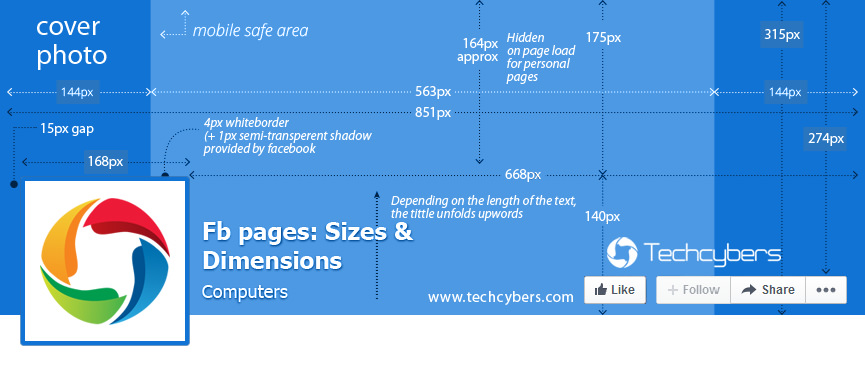
Have you ever tried to upload photos in banner and couldn’t point your photos to expose each area in pixels? Here is the correct Facebook banner in pixels explained.
Your Page’s cover photo:
• Displays at 851 pixels wide by 315 pixels tall on your Page on computers and 640 pixels wide by 360 pixels tall on smartphones
• Doesn’t display on feature phones
• Must be at least 399 pixels wide and 150 pixels tall
• Loads fastest as an sRGB JPG file that’s 851 pixels wide, 315 pixels tall and less than 100 kilobytes
Your Page’s profile picture:
• Displays at 160×160 pixels on your Page on computers, 140×140 pixels on smartphones and 50×50 pixels on most feature phones
• Must be at least 180×180 pixels
• Will be cropped to fit a square
• Is located 16 pixels from the left and 176 pixels from the top of your cover photo on computers
• Is located 24 pixels from the left, 24 pixels from the bottom and 196 pixels from the top of your cover photo on

Like Us on Facebook:  

Follow Us on Linkedin:  

If you are looking for a based company for your website design work, then you must contact us for a better web design deal. Choosing your based company really matters for your company web design work.
How to Setup Outlook 2010 (IMAP)

By blog

follow below steps:

Adding a new account:

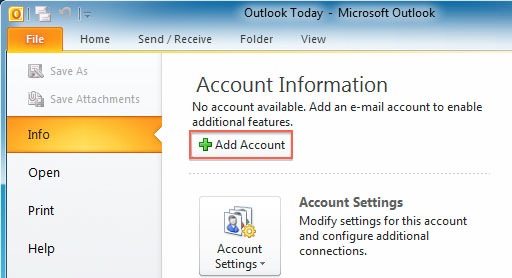
  1. Select the ‘File’ menu
  2. Select Info
  3. Click the Add Account button
How to Setup Outlook 2010 step 1

Set up outlook 2010 emails

4. Choose Manually configure server settings

How to Setup Outlook 2010 step 2

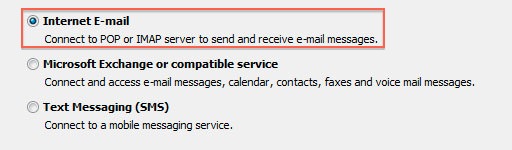
5. Click Next
6. Choose Internet E-Mail
How to Setup Outlook 2010 step 3

7. Click Next

Account Settings

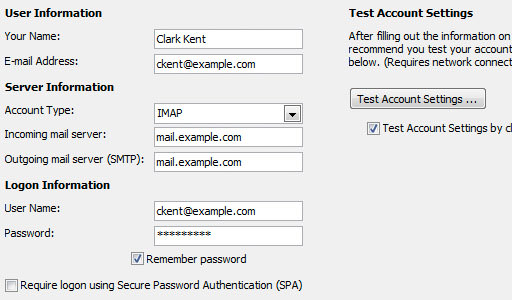
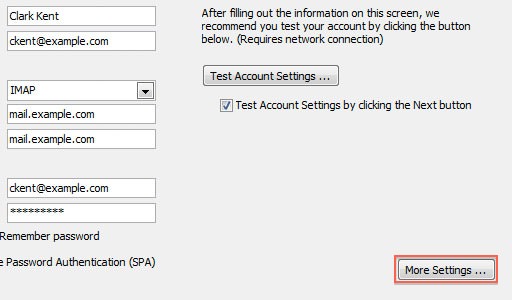
  1. Enter your name as you want it to appear on your outbound email messages
  2. Enter your full email address
  3. Enter your full email address also as the User Name
  4. Enter your email password
  5. Your mail server is mail.YourDomain.com, eg mail.example.com (where YourDomain.com is your own domain name)
  6. The Outgoing Mail Server is the same as your incoming mail server

How to Setup Outlook 2010 step 4

More Settings

  1. Click the More Settings button

How to Setup Outlook 2010 step 5

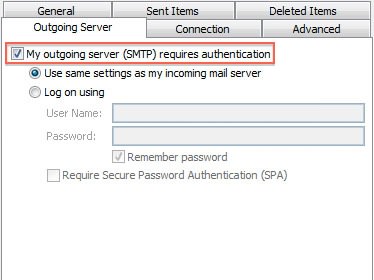
2. Click the Outgoing Server tab
How to Setup Outlook 2010 step 6

3. Check the “My outgoing server (SMTP) requires authentication” checkbox
4. Check “use the same settings as your incoming mail server”
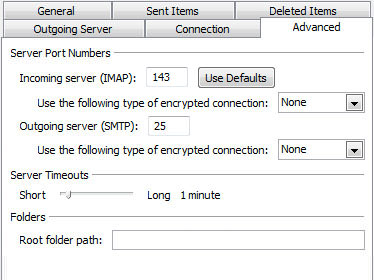
5. Click the Advanced tab

How to Setup Outlook 2010 step 7
6. If you are using POP3 with SSL, click the checkbox and enter 995 as your port. Otherwise leave the default port at 110
7. If you are using POP3, you may choose when messages are removed from the server
8. If you are using IMAP with SSL, click the checkbox and enter 993 as your port. Otherwise leave the default port at 143
9. If you are using SMTP with SSL, click the checkbox and enter 465 as your port. Otherwise change non-default port to 26
10. Click the OK button

Testing Settings (Final Step)

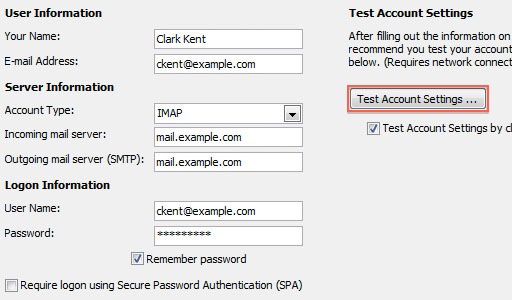
1. While on the E-mail Accounts screen, click the Test Account Settings button
2. This will both check your settings and send a test email to yourself to confirm that everything is working. If you receive any errors, please check your configuration
3. Click the Close button on the Test Account Settings window
4. Click Next on the E-mail Accounts window
5. Click the Finish button

How to Setup Outlook 2010 step 8

Done.

Like Us on Facebook:  

Follow Us on Linkedin:  

If you are looking for a based company for your website design work, then you must contact us for a better web design deal. Choosing your based company really matters for your company web design work.