All Posts By

Tech3

How to import contact from gmail to outlook

By blog

Step-1.

click on “Mail -> Contacts” in your Gmail inbox.
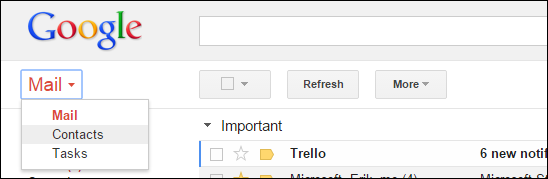
How to import contact from gmail to outlook step 1

Step-2.

Next, the “More” button and choose “Export…” from the dropdown selections.
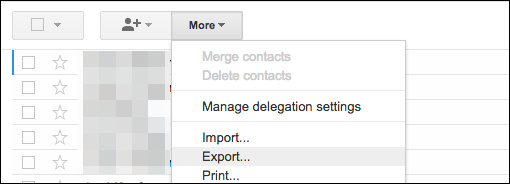
How to import contact from gmail to outlook step 2

Step-3.

Notice, you can export a group, selected contacts, or all your contacts into one of three formats. The export format should be an Outlook .CSV (CSV = Comma Separated Values, which means each field [Name, Address, Phone, etc.] is separated by a comma) file.
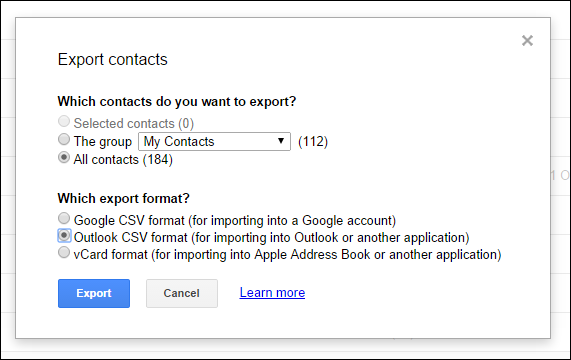
How to import contact from gmail to outlook step 3

Step-4.

Note, you can open this exported .CSV file in Excel and manipulate it you like, such as adding addresses, phone numbers, e-mail addresses, and other information that will help round out your address book.
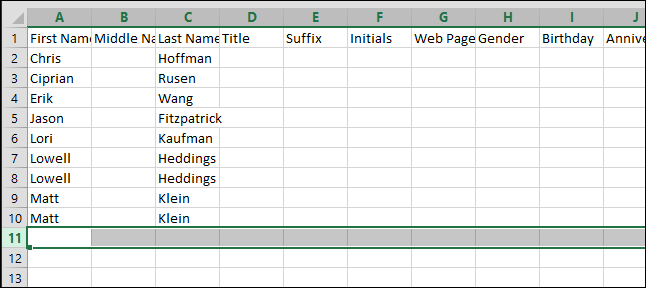
How to import contact from gmail to outlook step 4

Step-5.

While this is an optional step, it’s nice to be able to go through and make your contacts neat and consistent.

When you’re ready, it’s time to import your shiny new contacts file into Outlook. Click on “File” and then “Import/Export.”
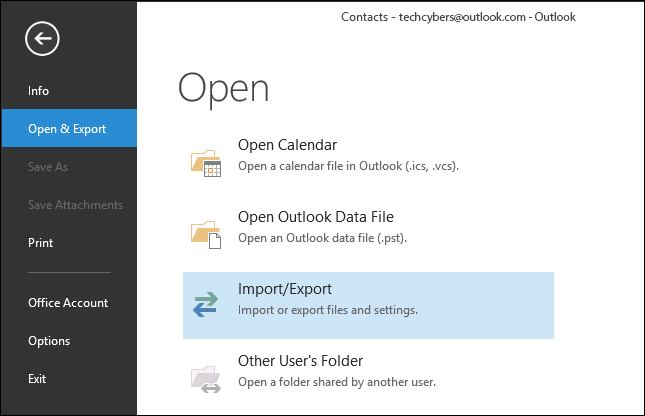
How to import contact from gmail to outlook step 5

Step-6.

On the Open screen, click “Import/Export” and you’ll be shown a wizard dialog. You want to choose “Import from another program or file” and click “Next.”
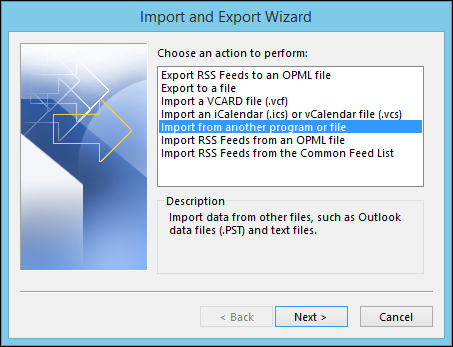
How to import contact from gmail to outlook step 6

Step-7.

Now, choose “Comma Separated Values” and click “Next.”
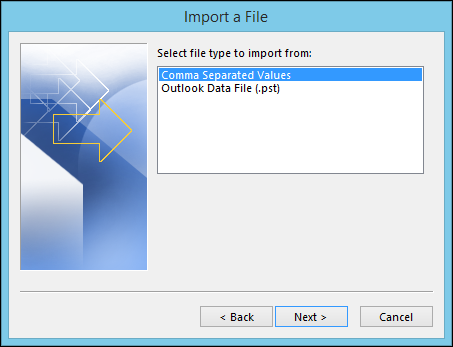
How to import contact from gmail to outlook step 7

Step-8.

You’ll then be asked to browse for the file you want to import. Under options, you can decide whether or not you want duplicates to be imported.

We select “do not import duplicate items,” and click “Next.”
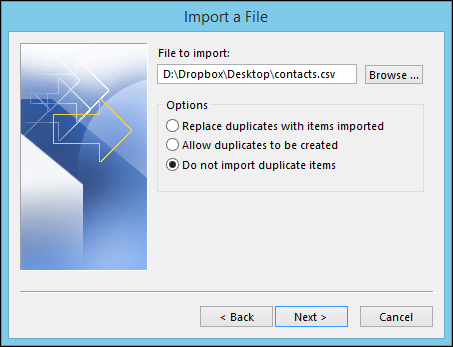
How to import contact from gmail to outlook step 8

Step-9.

The following screen will ask you to select a destination folder, which should be your Outlook contacts.
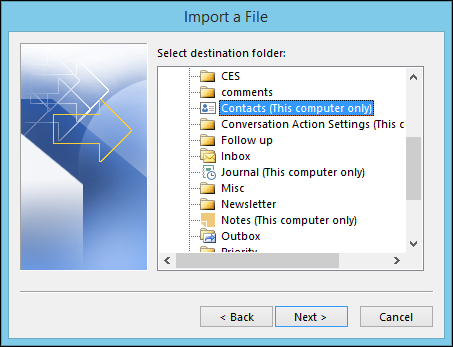
How to import contact from gmail to outlook step 9

Step-10.

Go ahead and click “Finish” on the last screen and your contacts will be imported into Outlook. You can see your results by opening the People mode.
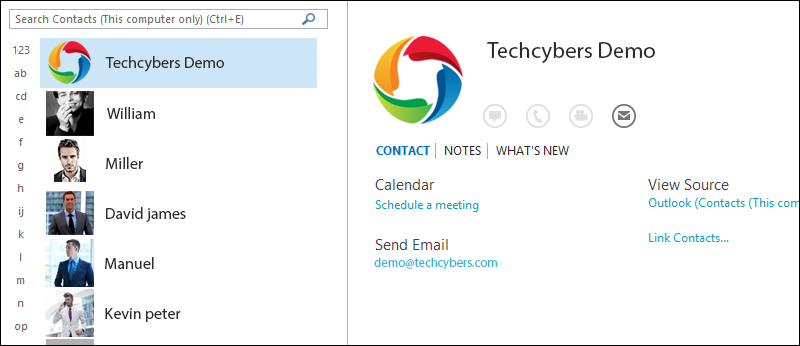
How to import contact from gmail to outlook step 10

Now, you can go through and edit to your heart’s content such as adding images, mailing addresses, secondary phone numbers, and any other bits of information you think are important and relevant.

Like Us on Facebook:  

Follow Us on Linkedin:  

If you are looking for a based company for your website design work, then you must contact us for a better web design deal. Choosing your based company really matters for your company web design work.
View your google calendar in your outlook

By blog


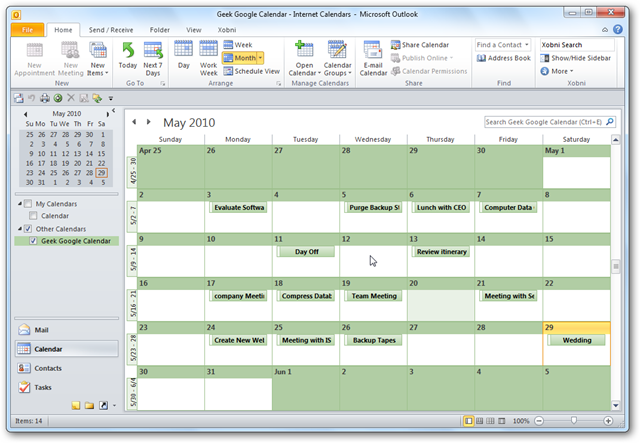
Google Calendar is a great way to share appointments, and synchronize your schedule with others. Here we show you how to too.

Google Calendar

Step-1.

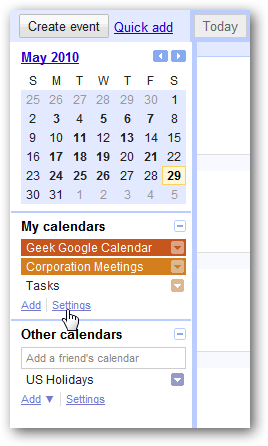
Log into the Google Calendar and under My Calendars click on Settings.

View your google calendar in your outlook step 1

Step-2.

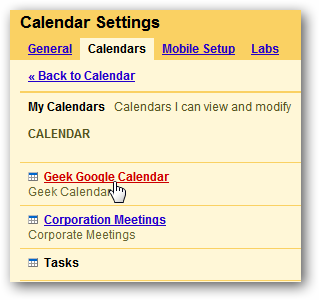
Now click on the .

View your google calendar in your outlook step 2

Step-3.

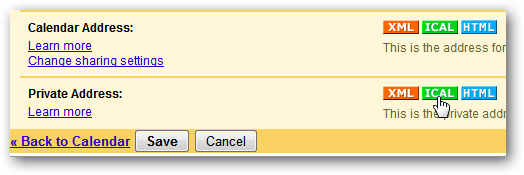
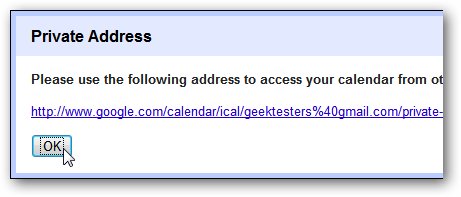
Scroll down the page and click on the ICAL button from the Private Address section, or Calendar Address if it’s a public calendar…then copy the address to your clipboard.

View your google calendar in your outlook step 3-1

View your google calendar in your outlook step 3-2

Outlook 2010

Step-4.

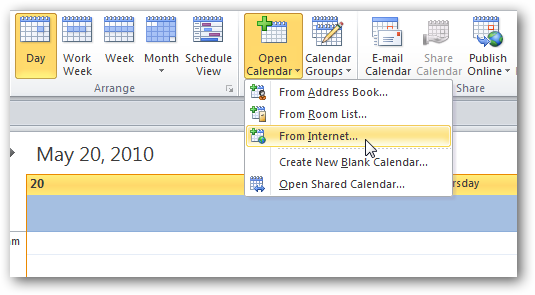
Open up your Outlook calendar, click the Home tab on the Ribbon, and under Manage Calendars click on Open Calendar \ From Internet…

View your google calendar in your outlook step 4

Step-5.

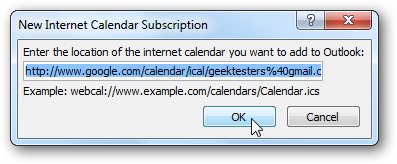
Now enter the link location into the New Internet Calendar field then click OK.

View your google calendar in your outlook step 5

Step-6.

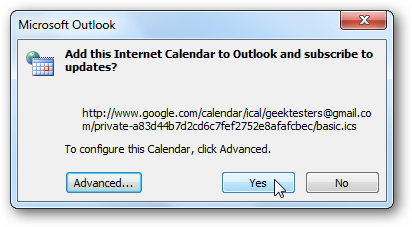
Click Yes to the dialog box that comes up verifying you want to subscribe to it.

View your google calendar in your outlook step 6

Step-7.

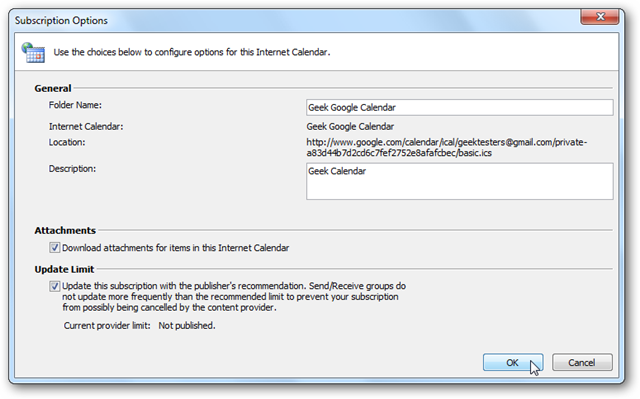
If you want more subscription options click on the Advanced button. Here you can name the folder, type in a description, and choose if you want to download attachments.

View your google calendar in your outlook step 7

That is all there is to it! Now you will be able to

View your google calendar in your outlook step 8

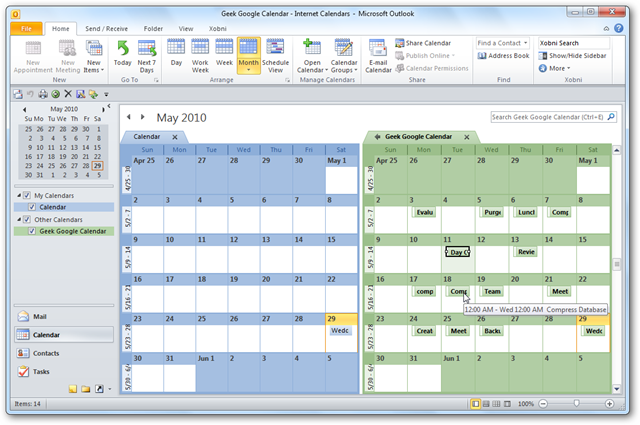
You’ll also be able to view your local computer and the Google Calendar side by side…

View your google calendar in your outlook step 9

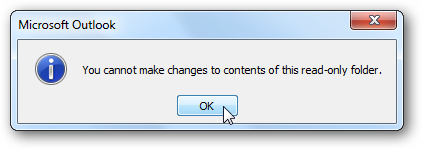
Keep in mind that this only gives you the ability to view the Google Calendar…it’s read-only. Any changes you make on the Google Calendar site will show up when you do a send/receive.

View your google calendar in your outlook step 10

Like Us on Facebook:  

Follow Us on Linkedin:  

If you are looking for a based company for your website design work, then you must contact us for a better web design deal. Choosing your based company really matters for your company web design work.
How to Setup Outlook 2010 (POP3)

By blog

in few clicks

Step-1.

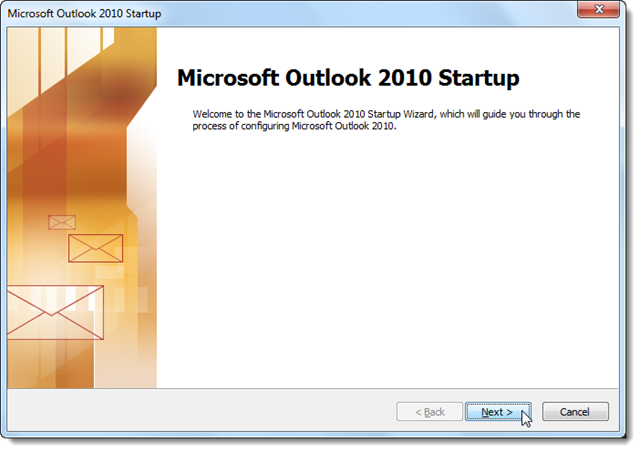
If you haven’t run Outlook 2010 yet, click Next to start setup and add your email account.

How to Setup Outlook 2010 (POP3) Step 1

Step-2.

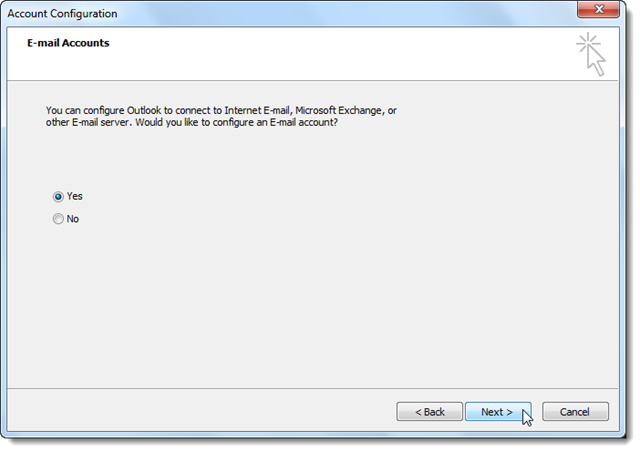
Select Yes to add an email account to Outlook. Now you’re ready to start entering your settings to access your email.

How to Setup Outlook 2010 (POP3) Step 2

Step-3.

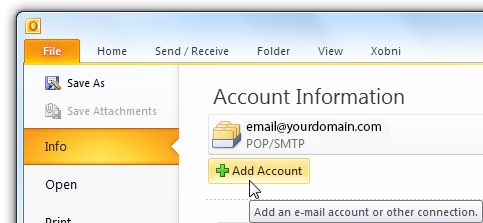
Or, if you’ve already been using Outlook and want to add a new POP account, click File and then select Add Account under Account Information.

How to Setup Outlook 2010 (POP3) Step 3

Manually Configure Outlook for Gmail

Step-4.

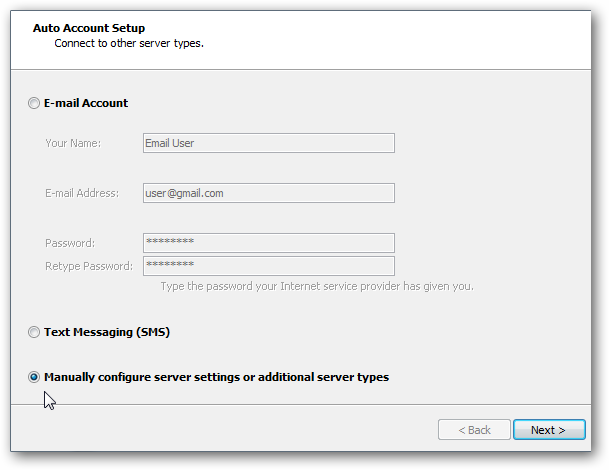
Select Manually configure server settings or additional server types and click Next.

How to Setup Outlook 2010 (POP3) Step 4

Step-5.

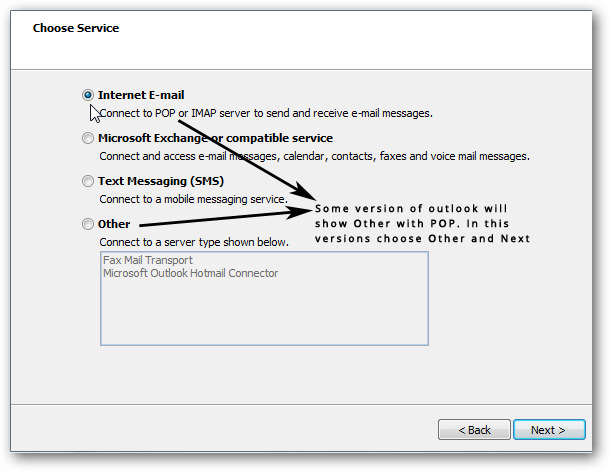
Select Internet E-mail and then click Next.

Step-6.

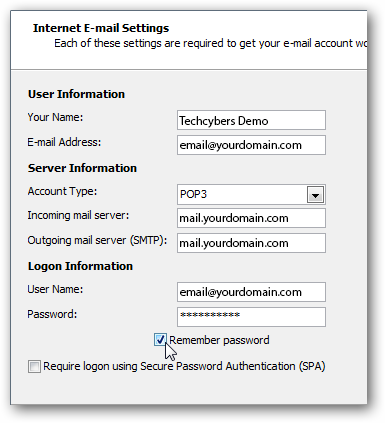
Enter your username, email address, and log in information. Under Server information enter in the following:
Account Type: POP3
Incoming mail server: mail.yourdomain.com
Outgoing mail server: mail.yourdomain.com
Make sure to check Remember password so you don’t have to enter it every time.

How to Setup Outlook 2010 (POP3) Step 6

Step-7.

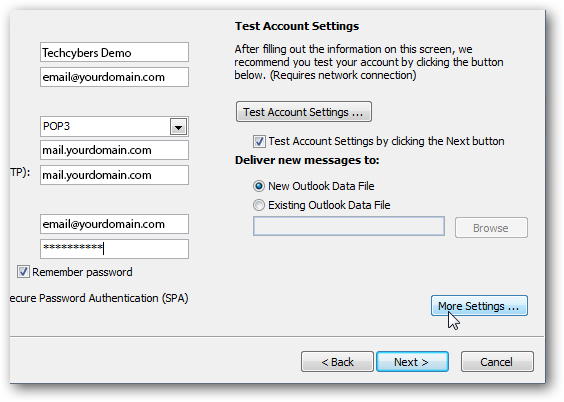
After that data is entered in, click on the More Settings button.

How to Setup Outlook 2010 (POP3) Step 7

Step-8.

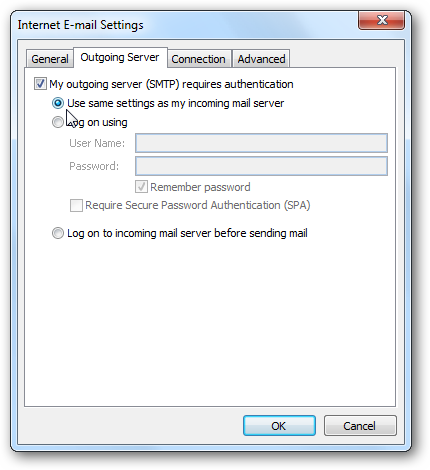
Select the Outgoing Server tab, and check My outgoing server (SMTP) requires authentication. Verify Use same settings as my incoming mail server is marked as well.

How to Setup Outlook 2010 (POP3) Step 8

Step-9.

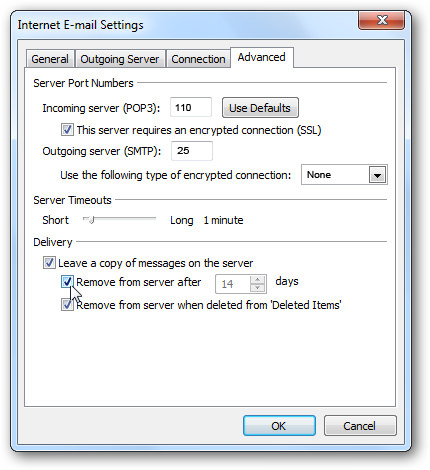
Next select the Advanced tab and enter the following information:
Incoming Server (POP3): 995
Outgoing server (SMTP): 587
Check This server requires an encrypted connection (SSL)
Set Use the following type of encrypted connection to TLS
You also might want to uncheck the box to Remove messages from the server after a number of days. This way your messages will still be accessible from Email online.

How-to-Setup-Outlook-2010-POP3-Step-9

Step-10.

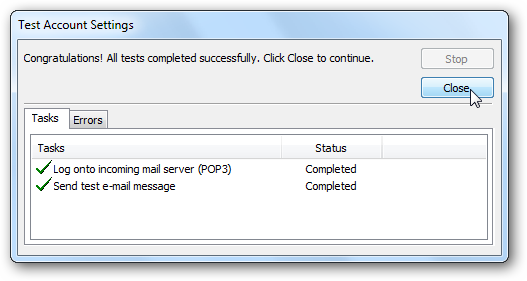
Click OK to close the window, and then click Next to finish setting up the account. Outlook will test your account settings to make sure everything will work, click Close when this is finished.

How to Setup Outlook 2010 (POP3) Step 10

Step-11.

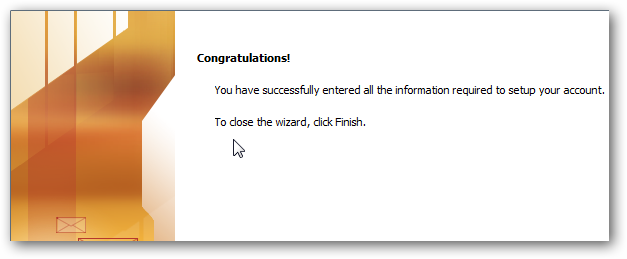
Provided everything was entered in correctly, you’ll be greeted with a successful setup message…click Finish.

How to Setup Outlook 2010 (POP3) Step 11

That’s all you have successfully finished

Like Us on Facebook:  

Follow Us on Linkedin:  

If you are looking for a based company for your website design work, then you must contact us for a better web design deal. Choosing your based company really matters for your company web design work.
How do I set up Domains email on my iPhone?

By blog

Please check with your phone’s instruction manual for specific set up instructions.
To , please follow these steps:

Step-1.

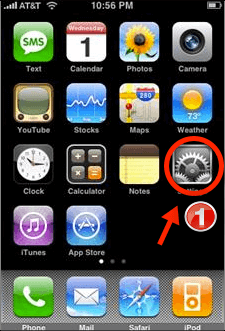
Tap on Settings from your home screen. Your settings panel displays.
How do I set up mail on my iphone- tech_1

Step-2.

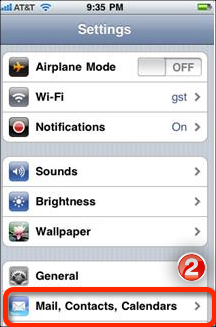
Scroll down and tap Mail, Contacts, Calendars.
How do I set up mail on my iphone-tech_ 2

Step-3.

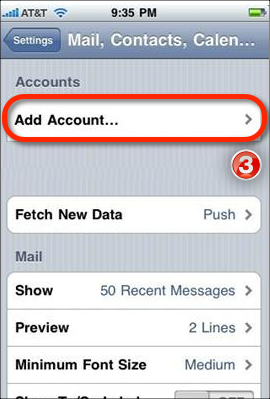
Tap on Add Account.
How do I set up mail on my iphone- tech_3

Step-4.

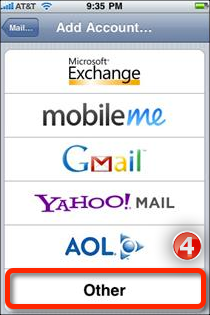
Scroll to the bottom of the screen and tap Other.
How do I set up mail on my iphone-tech_ 4

Step-5.

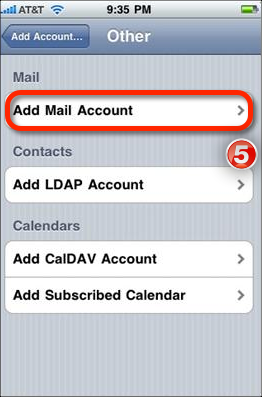
Tap Add Mail Account.
How do I set up mail on my iphone- tech_5

Step-6.

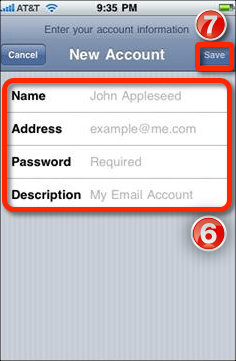
Enter your name, your full email address (email@yourdomain.com), your password and any description you would like for the account).

Step-7.

Tap Save.
How do I set up mail on my iphone-tech_ 6

Step-8.

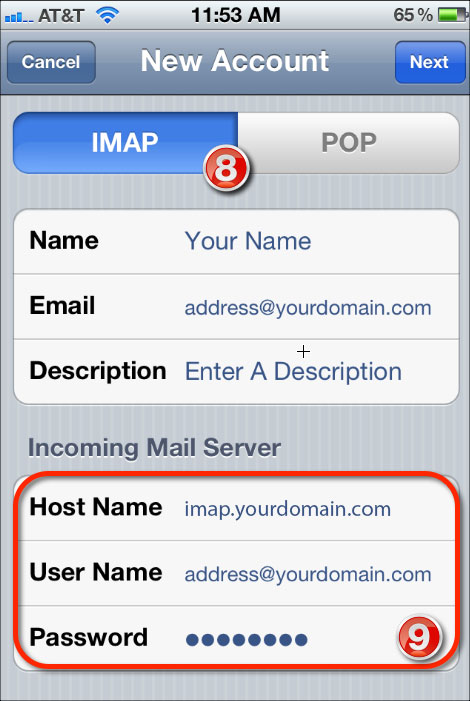
Ensure IMAP is selected at the top of the screen.

Step-9.

Enter imap.yourdomain.com for Host Name. Enter your User Name and full email address and password.
How do I set up mail on my iphone- tech_8 9

Step-10.

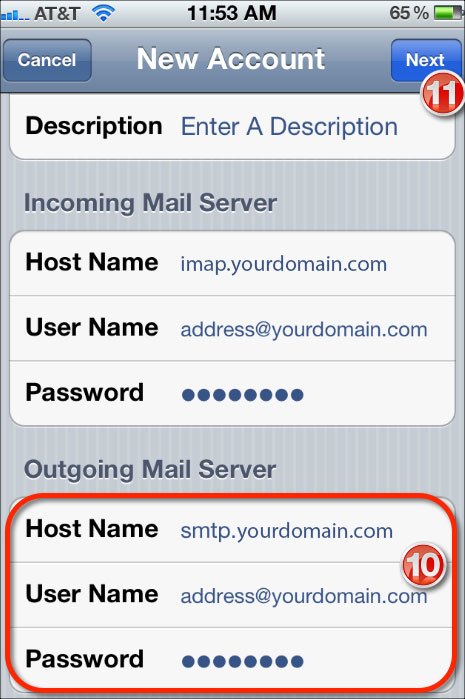
Scroll down and enter smtp.yourdomain.com for the Host Name.

Step-11.

Tap Next. This will verify your settings and then take you to your Inbox.
How do I set up mail on my iphone- tech_10 11

That’s all you have done

Like Us on Facebook:  

Follow Us on Linkedin:  

If you are looking for a based company for your website design work, then you must contact us for a better web design deal. Choosing your based company really matters for your company web design work.
Why Need Mobile Responsive Web Design

By blog

why need mobile responsive web design

1. Google Gives High Priority for Responsive .
2. No Need Multi Versions of Your Website for Mobile and Desktops.
3. In Mobile Device No Need to Zoom or Slide right or Left to See Your Content.
4. Smooth User Experience.
5. No Need Redirects to Mobile Site.
6. One Management System to Update Content for Mobile and Desktops.
7. Flexible Navigation Styles.

How Works?

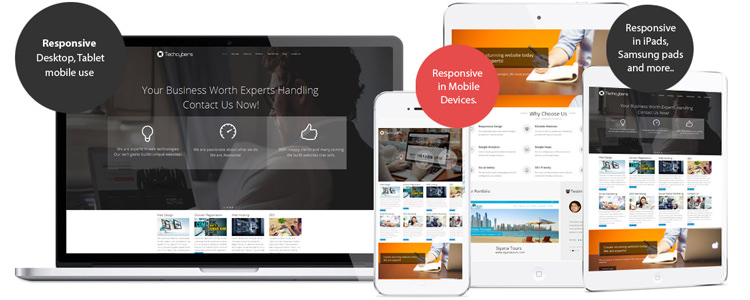
The word “responsive” in web design field means that the entire layout responds based on the user’s screen resolution or the device which he or she opens the website. There are situations that a person were browsing a website on his tablet, then switched to another device for one reason or another. In this case the browser window will re-sized automatically. A responsive Responsive Design layout will automatically adjust the resolution according to the device.

Why Design for Mobile?

It is true that more users are going mobile and spending more time in mobile devices, and not just for on-the-go web browsing either.
“In this era designing for mobile is certainly a requirement in modern day standards.”

is The Future of The Web

is all about automatically delivering your audience the content they want, within the context that they’re viewing it.

It is revolutionary for online publishers, because (for most) responsive design eliminates the need for multiple versions of your site, or expensive app development and maintenance.

Conclusion

is pretty cool. You can drag and drop the browser window smaller and bigger and watch the website content change according to the size of the window. This is applicable for testing purpose only.

Like Us on Facebook:  

Follow Us on Linkedin:  

If you are looking for a based company for your website design work, then you must contact us for a better web design deal. Choosing your based company really matters for your company web design work.